Thursday, November 21, 2024

Tuesday, November 19, 2024
Comparison between Pneumatic, Electrical and Hydraulic signal system
| Criteria | Pneumatic Signal | Hydraulic Signal | Electrical Signal |
|---|---|---|---|
| Medium | Compressed air | Oil or fluid | Electric current or voltage |
| Speed | Moderate | Slower compared to pneumatic | Very fast |
| Accuracy | Moderate | High | Very high |
| Power Transmission | Low | High | Moderate |
| Reliability | High | High | Moderate (depends on conditions) |
| Application | Used in tools and light systems | Heavy machinery | Electronics and precise controls |
| Cost | Low | High | Variable |
| Environmental Impact | Minimal | Risk of leaks and contamination | Depends on energy source |
| Standard Signal Range | 3 to 15 psi | 10 to 50 bar (varies by system) | 4 to 20 mA, 0 to 10 V |
Friday, November 8, 2024
S-Parameters – Scattering Parameters in RF and Microwave Circuits
1. Introduction to S-Parameters
S-parameters, or scattering parameters, are essential for understanding how RF (Radio Frequency) and microwave circuits behave, particularly in terms of power, gain, reflection, and transmission. These parameters simplify the analysis of networks by describing how they interact with incident and reflected signals, especially useful at higher frequencies where conventional parameters like impedance and admittance are not easily measured.
S-parameters are defined based on traveling waves and are represented as a matrix, making them ideal for multi-port networks. They provide insight into both the power gain and loss in networks and are especially useful in characterizing components like amplifiers, filters, antennas, and interconnects.
2. Understanding Scattering and Reflection
In RF circuits, a signal can be reflected or transmitted when it encounters a discontinuity or impedance mismatch. Scattering parameters quantify how much of an incident signal is reflected or transmitted from one port to another. They help engineers predict performance in real-life conditions and optimize the design to minimize losses or undesired reflections.
For a network with ports, each port can transmit or reflect signals. If a signal is incident on a port, part of it may reflect back (due to impedance mismatch), and the remaining may transmit through other ports. S-parameters quantify this phenomenon.
3. Basics of S-Parameter Notation
S-parameters are generally represented as an S-matrix, where each element is defined as follows:
- : Represents the ratio of the signal power reflected or transmitted from port due to an incident signal on port .
- For example: is the reflection coefficient at port 1 due to an incident wave at port 1, while is the transmission coefficient from port 1 to port 2.
For a 2-port network, the S-parameter matrix is typically:
- : Input reflection coefficient – proportion of signal reflected back from the input.
- : Forward transmission coefficient – proportion of signal transmitted from port 1 to port 2.
- : Reverse transmission coefficient – proportion of signal transmitted from port 2 to port 1.
- : Output reflection coefficient – proportion of signal reflected back from the output.
4. Measuring S-Parameters
S-parameters are measured using a Vector Network Analyzer (VNA), a device capable of injecting signals at high frequencies into the network and then detecting the incident, reflected, and transmitted waves. Measurements are made under specific conditions, often assuming that all ports except the port under test are terminated in their characteristic impedance (often 50 ohms).
5. Practical Use of S-Parameters
S-parameters are especially valuable in:
- Impedance Matching: Understanding reflections at the input and output ports helps design matching networks that reduce unwanted reflections.
- Gain and Loss Calculations: The transmission coefficients and directly relate to how much signal is passed through the network, enabling gain/loss calculations.
- Isolation Measurements: In isolators and circulators, S-parameters can indicate the amount of isolation between ports.
6. Characteristics of S-Parameters in Different Networks
- Reciprocal Networks: For passive, reciprocal networks (e.g., attenuators, passive filters), . That is, for a 2-port network.
- Non-Reciprocal Networks: Active devices like amplifiers can have , representing directional gain or loss.
- Lossless Networks: If a network is lossless (e.g., an ideal transformer), the total power output equals the input, and the S-parameters satisfy certain power-conservation conditions.
7. Examples of S-Parameters in RF Components
Example 1: Transmission Line
- Transmission Line with Mismatched Load: For a transmission line terminated with a load different from its characteristic impedance, reflections occur. The reflection coefficient can be calculated based on the mismatch. would represent the amount of signal that passes through to the load.
Example 2: RF Amplifier
- Amplifier with Gain: For an amplifier, often represents the gain, while may indicate reverse isolation. If is low, it implies that the amplifier largely blocks reverse signals.
8. S-Parameter Conversions and Calculations
- From S-Parameters to Other Parameters: S-parameters can be converted to impedance parameters (Z-parameters) or admittance parameters (Y-parameters) if required for certain calculations.
- Using Complex Numbers: S-parameters are complex, represented by magnitude and phase. In practical applications, the phase information is crucial for determining the exact behavior of the network, especially in designing phase-sensitive components.
9. Smith Chart and S-Parameter Visualization
A Smith Chart is a graphical tool often used alongside S-parameters for visualization. It plots the reflection coefficient (like or ), enabling easier impedance matching and understanding of the complex behavior of RF networks.
10. Advantages and Limitations of S-Parameters
Advantages:
- Frequency-Specific: S-parameters are measured at specific frequencies, allowing high-precision analysis.
- Ease of Use in High Frequencies: Conventional parameters (like Z and Y) are difficult to measure at high frequencies, while S-parameters simplify the process.
- Useful for Non-Reciprocal Networks: S-parameters can characterize both passive and active devices, unlike impedance parameters, which may not fully capture the behavior of active components.
Limitations:
- Frequency Dependence: S-parameters are strictly frequency-dependent, so they must be recalculated if the operating frequency changes.
- Only Applicable to Linear Networks: They are primarily useful in linear or quasi-linear networks; non-linear devices require more complex modeling techniques.
11. Practical Tips and Best Practices
- Always Terminate Unused Ports: When measuring S-parameters, ensure all unused ports are terminated in their characteristic impedance to avoid reflections.
- Use Proper Calibration: Calibrate the VNA before measurements to avoid errors.
- Monitor Temperature: Temperature variations can affect S-parameters, particularly in sensitive devices like amplifiers.
12. Summary
S-parameters are a powerful tool in RF and microwave engineering, simplifying complex analyses of how signals scatter within multi-port networks. By providing insight into reflection, transmission, and impedance matching, they allow for precise tuning and optimization of high-frequency circuits and components. For engineers, mastering S-parameters opens doors to designing more efficient, reliable, and high-performance RF systems.
Monday, October 21, 2024
Difference between Active and Passive Transducer
| Feature | Active Transducers | Passive Transducers |
|---|---|---|
| Power Supply | Requires an external power source to operate | Does not require an external power source |
| Energy Conversion | Converts physical quantities directly into electrical signals | Converts physical quantities into a change in non-electrical form (e.g., resistance) |
| Output Signal | Direct electrical signal (voltage or current) | Change in resistance, capacitance, or inductance (needs external circuit to measure) |
| Signal Processing | Signal can be read directly, no need for complex circuitry | Requires external circuits (e.g., bridge circuits) to process the signal |
| Examples | Thermocouples, Piezoelectric sensors, Photovoltaic cells | Strain gauges, Thermistors, LVDTs |
Absorptive and Reflective RF switches: Introduction and comparison
Understanding Absorptive and Reflective RF Switches: A Deep Dive into RF Switching Technology
In the world of Radio Frequency (RF) technology, switches play a crucial role in controlling signal flow between different circuits. RF switches are integral components in a wide range of applications, from wireless communication systems to radar and satellite systems. Among the various types of RF switches, absorptive and reflective RF switches are two of the most common, each with distinct characteristics and use cases.
In this blog, we’ll explore what absorptive and reflective RF switches are, how they work, and where each type is best suited.
What Are RF Switches?
An RF switch is a device used to route high-frequency signals from one transmission line to another. Essentially, it acts as a gatekeeper, controlling which path the RF signal will take in a circuit. This functionality is essential in applications where signals need to be selectively sent to different receivers, antennas, or testing equipment.
RF switches can be designed using different technologies such as PIN diodes, field-effect transistors (FETs), and micro-electromechanical systems (MEMS), depending on the specific needs of the application in terms of speed, power, and frequency.
The Difference Between Absorptive and Reflective RF Switches
The primary distinction between absorptive and reflective RF switches lies in how they handle the signal on the ports that are not selected (i.e., the "off" ports). Let’s take a closer look at each type.
Absorptive RF Switches
An absorptive RF switch (also called a terminated switch) is designed to present a matched impedance (typically 50 ohms) to all of its ports, regardless of whether the port is active (connected) or inactive (disconnected). When a signal is routed through one path, the other paths are terminated with matched loads to prevent signal reflection and standing waves.
How Absorptive Switches Work:
- When a port is not selected, the switch routes the signal to a termination (typically an internal 50-ohm resistor).
- This absorption of the signal into a matched load prevents any signal from being reflected back into the circuit.
- By terminating inactive paths, the switch ensures that there is minimal interference or signal distortion, making it ideal for sensitive RF systems.
Applications:
Absorptive RF switches are preferred in systems where signal integrity is critical, and reflections or standing waves could cause performance degradation. They are often used in:
- Test and measurement equipment
- Communication systems requiring high precision
- RF signal routing in sensitive environments like radar and satellite communications
Reflective RF Switches
A reflective RF switch, on the other hand, does not provide matched impedance on its inactive ports. Instead, when a port is not selected, the signal is reflected back into the circuit. The inactive ports are left open or short-circuited, which causes signal reflections rather than termination.
How Reflective Switches Work:
- When a port is not selected, it remains disconnected without any termination.
- The signal that hits the inactive port is reflected back into the circuit.
- These reflections can sometimes interfere with the active signal path, depending on the system design and the level of isolation between ports.
Applications:
Reflective RF switches are commonly used in applications where reflections are either acceptable or can be managed by the overall system design. They are particularly useful in:
- RF power switching where high levels of power are present
- Systems where cost and simplicity are more important than minimizing signal reflections
- Antenna selection switches, where reflections may not be critical
Key Differences Between Absorptive and Reflective Switches
| Feature | Absorptive RF Switch | Reflective RF Switch |
|---|---|---|
| Impedance Matching | Provides matched impedance (usually 50 ohms) on all ports | Only the active path is impedance matched; inactive ports reflect signals |
| Signal Handling on Inactive Ports | Terminates signals to a matched load | Reflects signals back into the circuit |
| Performance Impact | Reduces reflections, minimizes interference, and maintains signal integrity | May cause signal reflections, potentially leading to interference |
| Typical Applications | Test and measurement equipment, precision communication systems, radar systems | High-power applications, antenna switching, systems where reflections are acceptable |
Choosing the Right Switch for Your Application
The decision to use an absorptive or reflective RF switch depends on the specific needs of the application. If your system is highly sensitive to signal reflections and requires precise signal integrity, an absorptive switch is likely the better choice. This is especially true in test environments and high-performance communication systems where even small amounts of signal distortion could lead to significant performance issues.
On the other hand, if your application involves switching high power RF signals or if reflections won’t have a significant impact on performance, a reflective switch may be more cost-effective and simpler to implement.
Conclusion
Absorptive and reflective RF switches offer different advantages depending on the nature of your RF system. Absorptive switches are designed to minimize reflections and maintain signal integrity, making them ideal for sensitive applications. Reflective switches, on the other hand, are simpler and better suited to high-power applications where reflections can be tolerated or managed.
When selecting the right RF switch for your system, consider factors like signal integrity, power levels, cost, and system complexity. Understanding the differences between these two types of RF switches can help you make the best decision for your specific needs and ensure optimal performance of your RF circuits.
---
Whether you're designing a high-precision communication system or working on a robust power-switching solution, knowing how absorptive and reflective RF switches function will give you the edge in optimizing your RF system's performance.
Saturday, October 19, 2024
Multi Channel Analog data display on Python based GUI from Arduino Serial port
To create a Python Tkinter GUI that fetches many comma-separated values from a serial port and displays them we can use the pyserial library to handle the serial communication. Below is a simple example demonstrating how to achieve this. Make sure you have both tkinter and pyserial installed. You can install pyserial using pip if you haven't done so already:
The arduino code is simple modified version of available AnalogReadSerial example. In the code 4 AI channels are read and one DI channel is read. Their values are transmitted over Serial port. Note the COM port number of device and change accordingly in the code.
// the setup routine runs once when you press reset: void setup() { // initialize serial communication at 9600 bits per second: Serial.begin(9600); } // the loop routine runs over and over again forever: void loop() { // read the input on analog pin 0: int Val1 = analogRead(A0); int Val2 = analogRead(A1); int Val3 = analogRead(A2); int Val4 = analogRead(A3); bool state = digitalRead(8); // print out the value you read: Serial.print(Val1); Serial.print(Val2); Serial.print(Val3); Serial.print(Val4); Serial.println(state); delay(500); // delay in between reads for stability }
Below is the Python script.
import tkinter as tk
import serial

# Serial port configuration
SERIAL_PORT = 'COM3'  # Change this to your serial port
BAUD_RATE = 9600

class SerialApp:
    def __init__(self, master):
        self.master = master
        self.master.title("Serial Data Display")

        # Create labels for each value
        self.labels = ['Val1:', 'Val2:', 'Val3:', 'Val4:']
        self.value_labels = []

        # Configure font
        label_font = ("Helvetica", 30, "bold")

        # Create and place labels in grid
        for i, label in enumerate(self.labels):
            lbl = tk.Label(master, text=label, font=label_font)
            lbl.grid(row=i, column=0, padx=20, pady=10)
            value_lbl = tk.Label(master, text="", font=("Helvetica", 30))
            value_lbl.grid(row=i, column=1, padx=20, pady=10)
            self.value_labels.append(value_lbl)

        # Open serial port
        self.serial_port = serial.Serial(SERIAL_PORT, BAUD_RATE, timeout=1)

        # Update the GUI
        self.update()

    def update(self):
        try:
            # Read data from serial port
            line = self.serial_port.readline().decode('utf-8').strip()
            values = line.split(',')

            # Ensure we have four values
            if len(values) == 4:
                for value_lbl, value in zip(self.value_labels, values):
                    value_lbl.config(text=value)

        except Exception as e:
            print(f"Error: {e}")

        # Schedule the next update
        self.master.after(1000, self.update)

    def on_closing(self):
        self.serial_port.close()
        self.master.destroy()

if __name__ == "__main__":
    root = tk.Tk()
    app = SerialApp(root)

    # Handle window close event
    root.protocol("WM_DELETE_WINDOW", app.on_closing)

    root.mainloop()
The GUI will look as below

https://github.com/arihant122/Python-Tkinter-based-GUI-by-fetching-Serial-port-data-from-Arduino-
Monday, September 23, 2024
Getting Started with Codesys v3.5 and Wago PFC200 (750-8212)
Step 1: Search for Codesys v3.5 in any
search engine.
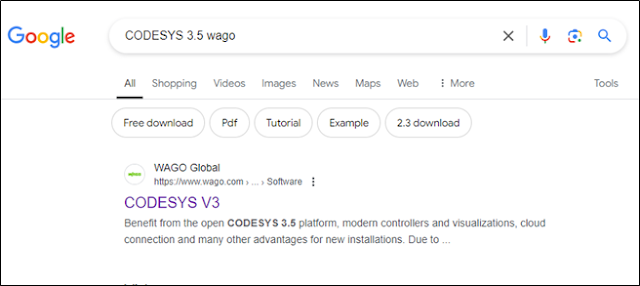
Step 2: When you click on the link, it redirects you to following page. Click on the download button. It will redirect you to a new webpage with Codesys v 3.5 descriptions.


Step
3:
Click on Open Page link, which open a new webpage.

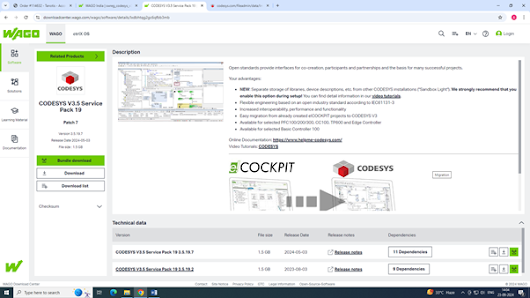

Step 5: Click on Codesys 3.5 setup file to initiate installation.

Once installation is complete, launch the Codesys to check if installation is correct.
After this, you have to
install Wago Licensing, Wago Solution Builder, Wago codesys Download Server,
Wago Device and Libraries which are downloaded in Step 4 as a bundle.
Step
6:
Again Launch Codesys 3. Create a New Project from Basic Operations.

Create a standard project
and then choose suitable Name and Location where you want to save the project
file.

Once done, you have to
select the Device and Programming Language from drop down menu.


I have selected 750-8212
as my PLC device and Ladder Logic Diagram as my programming language. You will
see the device list only if Wago Device and Libraries are properly installed.
Selected
target system is different from the connected device
Once you connect a Wago
PFC 750-8212 device with PC and develop a ladder program, you will have to
download the program into the PLC.
In some cases, it may
display “selected target system is
different from the connected device” error message. This happens due to
firmware incompatibility between the codesys wago device library and PLC
firmware. The user will have to update the firmware of the device in that case.
PLC
Firmware update


In the softwares downloaded in Step-1, you will find Firmware also which needs to be uploaded to the PLC. The firmware can be uploaded using Wagoupload. WAGOupload is a stand-alone PC software for transferring, backing up and restoring PLC applications on WAGO 750 Series controllers.

Subscribe to:
Posts (Atom)
-
 Current to Voltage converters or I to V converters as they are generally known are popular in process control applications where we need t...
 -
NI AWR : Best suited for RF and microwave circuit/system design with dedicated EM tools and harmonic balance analysis. Offers VSS for sy...
-
1. Make sure you have Wago Ethernet Setting, WAGO-IO-CHECK, Codesys V3.5 installed in the PC. 2. Check your PC’s IP addres...
